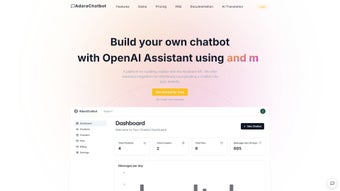

Download AdaraChatbot – Build AI Chatbots Fast, Free, Secure
Overview
AdaraChatbot is a web‑based conversational AI platform designed to let anyone—from seasoned developers to small‑business owners—create sophisticated chatbots without writing a single line of code. Powered by the latest OpenAI models—including GPT‑3, GPT‑3.5, and GPT‑4—the service delivers natural‑language understanding that rivals premium enterprise solutions while keeping the pricing structure transparent. After signing up, users simply paste their own OpenAI API key, choose a model, and configure a knowledge base by entering URLs that the system crawls and indexes.
The resulting chatbot can be embedded on any website with a one‑line JavaScript snippet, turning static pages on WordPress, Shopify, Squarespace, Wix, or custom HTML sites into interactive, conversion‑focused experiences. In addition to conversational capabilities, AdaraChatbot ships with built‑in lead‑capture forms, real‑time analytics dashboards, and version‑controlled settings, allowing marketers to track engagement metrics such as conversation length, drop‑off points, and conversion rates. Because billing is directly tied to the user’s OpenAI key, there are no hidden platform fees; usage is measured in token calls, and the free tier provides enough quota for testing or low‑traffic sites.
Comprehensive documentation, an active community forum, and tiered subscription plans—from a free starter tier to enterprise‑grade packages—make AdaraChatbot a flexible, secure, and future‑proof solution for any organization looking to leverage conversational AI on the web. Whether you need a simple FAQ bot, a sales‑assistant that qualifies leads, or a multilingual support agent, AdaraChatbot gives you the tools to build, deploy, and iterate rapidly, all within a browser‑based interface that works on any modern operating system.
Key Features, Pros, and Cons
- OpenAI Model Access: Choose from GPT‑3, GPT‑3.5, or GPT‑4 to match performance and budget requirements.
- Zero‑Code Integration: One‑line embed scripts for WordPress, Shopify, Squarespace, Wix, and any site that accepts custom JavaScript.
- URL‑Based Knowledge Base: Feed the bot with a list of URLs; it crawls, indexes, and retrieves up‑to‑date information for visitor queries.
- Lead Capture Forms: Collect emails, phone numbers, or custom fields directly within the chat window.
- Real‑Time Analytics: Dashboard visualizes conversation volume, intent distribution, drop‑off rates, and conversion metrics.
- Own OpenAI API Key: Transparent billing—no platform markup, you pay only what OpenAI charges.
- Cross‑Platform Compatibility: Works on any modern browser, supporting Windows, macOS, Linux, Android, and iOS devices.
- Extensive Documentation & SDK: Step‑by‑step guides, video tutorials, and API references for advanced customisation.
- Scalable Pricing: Free tier for testing, pay‑as‑you‑go for growing traffic, and enterprise plans with dedicated support.
Pros
- Instant access to cutting‑edge language models without managing servers or infrastructure.
- Drag‑and‑drop visual editor enables non‑technical users to launch a chatbot in minutes.
- Transparent usage costs via personal OpenAI API key eliminate surprise fees.
- Built‑in lead capture and analytics turn casual chats into measurable business outcomes.
- Broad compatibility with the most popular website builders and any modern browser.
Cons
- Reliance on OpenAI’s API means response latency can fluctuate based on network conditions.
- Highly custom behaviours (e.g., bespoke webhook logic) still require some coding knowledge.
- Free tier imposes token limits that may be restrictive for high‑traffic or enterprise use‑cases.
- Data privacy controls are robust but still depend on OpenAI’s underlying storage policies.
- Advanced multi‑bot management across many domains is only available on higher‑priced plans.
Installation, Usage & Compatibility
Getting started with AdaraChatbot is deliberately straightforward, allowing you to move from sign‑up to live chatbot in under ten minutes. The entire workflow is browser‑based, so there is no software to download or install on your local machine. Below is a detailed guide that covers account creation, API integration, widget configuration, and best‑practice usage tips.
Step‑by‑Step Installation
- Create an account: Visit the sign‑up page, provide an email address, verify the account via the confirmation link, and log in to the dashboard.
- Connect your OpenAI API key: In the “Billing & API” section, paste your personal OpenAI key. The platform validates the key instantly, confirming that you can start making token calls.
- Select a language model: Choose GPT‑3.5 for balanced cost‑performance or GPT‑4 for the most nuanced conversations. You can switch models later without re‑creating the bot.
- Define the knowledge base: Add the URLs you want the bot to reference. AdaraChatbot crawls each page, extracts main content, and stores it in a vector index for fast similarity search.
- Design the chat widget: Use the visual editor to set colour schemes, avatar images, welcome messages, and optional typing indicators. The editor shows a live preview.
- Generate embed code: Once configuration is complete, click “Generate Code.” The platform returns a short JavaScript snippet that contains your bot’s unique identifier.
- Insert the snippet into your site: For WordPress, add a Custom HTML block to the footer or use a plugin like “Insert Headers and Footers.” For Shopify, paste the code into the “Additional Scripts” field under Settings → Online Store → Preferences. For Squarespace and Wix, use the Code Injection feature located in the site settings.
- Publish and test: Open your website in a private browser window, start a conversation, and verify that the bot correctly references the URLs you supplied. Use the built‑in “Test Mode” to simulate different user intents without affecting live analytics.
Operating System Compatibility
Because the chatbot runs entirely as a client‑side widget, it is compatible with any operating system that supports a modern web browser. This includes Windows 10/11, macOS Monterey and later, popular Linux distributions, as well as mobile platforms such as Android 9+ and iOS 13+. No additional plugins or runtime environments are required, making the solution truly cross‑platform.
Ongoing Usage Tips
After deployment, monitor the analytics dashboard daily to identify high‑traffic intents, unanswered questions, and conversion bottlenecks. Adjust the prompt engineering—by tweaking system messages or adding example dialogues—to improve response relevance. Regularly update the URL knowledge base whenever new product pages, FAQs, or blog posts are published, ensuring the bot always delivers current information. For teams that need version control, use the “Snapshot” feature to save configurations before major changes, allowing a quick rollback if needed.
Scaling & Updates
Scaling is as simple as upgrading your subscription tier. Higher tiers increase the monthly token quota, unlock priority support, and permit multiple bot instances across different domains. All widget updates—new UI features, security patches, and model enhancements—are delivered automatically; the embed code remains unchanged, so you never need to re‑deploy the script on each site.
Frequently Asked Questions
Do I need any programming knowledge to create a chatbot with AdaraChatbot?
No. The visual editor and one‑click embed script are built for non‑technical users. You can have a functional chatbot live on your site in under ten minutes without writing code.
Can I use my own OpenAI API key, and will I be charged by AdaraChatbot?
Yes. You supply your own OpenAI key, and all usage is billed directly by OpenAI. AdaraChatbot does not add any markup fees, keeping costs transparent.
Is the chatbot data stored securely?
All conversation logs are encrypted in transit (TLS) and at rest. You can enable GDPR‑compliant retention policies and delete data on demand from the dashboard.
What website platforms are supported?
AdaraChatbot works with WordPress, Shopify, Squarespace, Wix, and any site that allows custom JavaScript. Because it runs in the browser, you can also embed it in static HTML pages or headless CMS environments.
How does the URL‑based knowledge base work?
You provide a list of URLs in the dashboard. The platform crawls those pages, extracts the main content, and stores it in a vector index. When a user asks a question, the bot searches this index to retrieve the most relevant snippet, ensuring answers are accurate and up‑to‑date.
Is there a free trial or a free plan?
Yes. AdaraChatbot offers a free tier that includes up to 5,000 token calls per month, basic analytics, and a single chatbot instance—ideal for testing, personal projects, or low‑traffic sites.
Conclusion – Is AdaraChatbot Right for You?
In today’s competitive digital landscape, conversational AI has moved from a novelty to a necessity. AdaraChatbot delivers a compelling mix of powerful language models, zero‑code deployment, and transparent pricing that makes it stand out among both DIY builders and enterprise‑grade platforms. The ability to feed the bot with live URLs ensures that answers stay relevant to your product catalog, blog content, or support documentation, while built‑in lead capture turns casual conversations into measurable conversions. For marketers looking to boost engagement, developers who need a quick prototype, and small‑to‑medium businesses seeking an affordable AI assistant, the platform hits the sweet spot of functionality and ease of use.
The primary trade‑offs are the dependency on OpenAI’s external API—meaning occasional latency spikes—and the fact that highly custom integrations still require some scripting knowledge. However, these limitations are outweighed by the speed of deployment, the flexibility of model selection, and the peace of mind that comes from transparent billing through your own API key. If you are ready to transform static web pages into interactive, conversion‑driven experiences, AdaraChatbot provides the tools you need without the overhead of managing servers or hiring a dedicated AI team.
Ready to see the impact for yourself? Download AdaraChatbot now, connect your OpenAI key, and launch a secure, intelligent chatbot on your site in minutes. Experience the future of web interaction today.



.png)



